Posts

Showing posts with the label 5

APEX Instance Admin Preferences Cheat Sheet

Image
APEX comes with an API - APEX_INSTANCE_ADMIN - where you can both get and set instance preferences. There is a list of available properties on the documentation, however I found that not all preferences were documented there. For example, in Feature Configuration, there are some preferences surrounding packaged applications: Looking at the documentation,  https://docs.oracle.com/cd/E59726_01/doc.50/e39149/apex_instance.htm#CHDFEICJ , you may find it difficult locating these. Then, there other properties in there that I don't think are relevant any more (..but not an expert on the subject, so may be wrong). Lets take the example of  PASSWORD_HISTORY_DAYS  - this states " Defines the maximum number of days a developer or administrator account password may be used before the account expires. The default value is 45 days. ". We can locate the property it's talking about under Security - Authentication Control - Development Environment Settings. ...
Building an Oracle 11G XE Server with APEX 5, ORDS and SQLcl in 30 minutes

Image
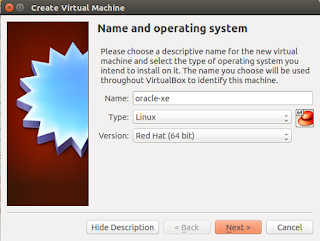
Pre-requisites 1. You have VirtualBox installed 2. You have the necessary Oracle installation files (oracle-xe, apex5, ords3 and sqlcl) Oracle XE - download from:  http://www.oracle.com/technetwork/database/database-technologies/express-edition/downloads/index.html Apex 5 - download from:  http://www.oracle.com/technetwork/developer-tools/apex/downloads/index.html ORDS 3 - download from: http://www.oracle.com/technetwork/developer-tools/rest-data-services/downloads/index.html SQLcl - download from:  http://www.oracle.com/technetwork/developer-tools/sql-developer/downloads/index.html 3. You have the installation image for CentOS - I just grabbed the Minimal image from a local mirror -  http://centos.mirror.digitalpacific.com.au/7/isos/x86_64/ Set up the virtual machine Give the Virtual machine an appropriate name, and since CentOS is based off Red Hat, specify the type as Red Hat (64-bit). Allocate 1GB RAM Create a new virtual hard drive...

Deploying individual components

Image
The scenario is you have two (or more) environments, some changes are ready from the development environment and others aren't - so you can't deploy the whole application, because some components are broken. Yes, you could employ the use of build options to prevent any issues happening, and only enable components when they are ready, but what other options are there? Well, APEX has functionality to export pages and individual components. So for one example, you've been good and kept the schema name, workspace names consistent. You also maintained the same application ID amongst environments. So, you do an page export from one environment, and try to import it to the other, but you receive the following error: This page was exported from a different application or from an application in different workspace. Page cannot be installed in this application. These components were exported from a different application or from an application in a different workspace. The c...

APEX 5 Give me Interactive Reports

Image
One of the statements of direction for APEX 5 is multiple interactive reports on a single page. Multiple Interactive Reports – Allow any number of Interactive Reports to be defined on a single page. So, time to explore that functionality. One pattern I've used in the past is loading particular saved reports (rather than the default primary report). You may have some pre-defined filters, a row highlight, specific columns. So for demonstrations, I've built an IR on the emp table. Then I go and apply some filters, and save an alternate report: Then in the page designer assign an alias to that report. As you can see, that allows me to enter in the request portion of the URL: IR_SAL_TOTAL. However, if we add a second IR to the page and try to access that saved report, we would receive an error "Report does not exist". This is because it tries to find that that report name in both IR's. To get around this, you MUST  set a static ID property fo...

Reset an Interactive Report (IR)

Image
To reset an IR back to the default settings, you may know you can go to the actions menu, and hit reset: If you inspect the apply button you will see it's calling gReport.reset() And there are a bunch of examples using this gReport object both for resetting the report and other IR functions. https://community.oracle.com/thread/2186564 https://community.oracle.com/thread/2595066 http://www.apex-at-work.com/2010/03/building-ir-filters-with-ajax-not.html http://www.apexninjas.com/blog/2012/06/the-greport-search-function-for-apex-interactive-reports/ The problem? This is not documented, and with APEX 5 supporting multiple IRs, this will no longer work. In your console, if you enter gReport, you will see that object no longer exists. The other technique you can use is the clear cache portion of the URL. According to the docs : To reset an interactive report in a link, use the string "RIR" in the Clear-Cache section of a URL. This is equivalent to the ...

APEX 5 API changes

Based on the current beta API docs:  https://docs.oracle.com/cd/E59726_01/doc.50/e39149/toc.htm , here is what's changed. APEX_APPLICATION_INSTALL Function GET_AUTO_INSTALL_SUP_OBJ added  Procedure SET_AUTO_INSTALL_SUP_OBJ added APEX_CUSTOM_AUTH LOGOUT procedure deprecated APEX_ESCAPE Function JSON added Function REGEXP added APEX_INSTANCE_ADMIN Procedure CREATE_SCHEMA_EXCEPTION added Procedure FREE_WORKSPACE_APP_IDS added Function GET_WORKSPACE_PARAMETER added Procedure REMOVE_SCHEMA_EXCEPTION added Procedure REMOVE_SCHEMA_EXCEPTIONS added Procedure REMOVE_WORKSPACE_EXCEPTIONS added Procedure RESERVE_WORKSPACE_APP_IDS added Procedure RESTRICT_SCHEMA added Procedure SET_WORKSPACE_PARAMETER added Procedure UNRESTRICT_SCHEMA added APEX_IR Procedure CHANGE_SUBSCRIPTION_EMAIL added Procedure CHANGE_REPORT_OWNER added APEX_LDAP Function SEARCH added APEX_PLUGIN_UTIL Function GET_ATTRIBUTE_AS_NUMBER added APEX_UTIL Procedure CLOSE_O...

APEX 5 creating regions on an existing page

Image
In APEX 4.2, it's nice and simple. Right click on the body node of the page tree view, and click create: After clicking create, you would be presented with all the possible region types: The rest is just a matter of following the steps. APEX 5, has a new page designer, and it took me a minute or so to figure out how to add a form region, since there seems to be a couple of options for adding regions! Firstly, in the centre column down the bottom of the page, you have a grid view of (almost) all the region types you can add. You can either drag them onto the visual layout of your page above, or right click and select where to add it to. The other option is on the left hand pane, right click and then select Create Region. . This will create a region with the type set as: "Static Content".  You then need to change the type on the right hand pane, and then fill out any region specific settings. At this point, it's probably ...