Posts

(My current) Atom editor Oracle plugins
Image
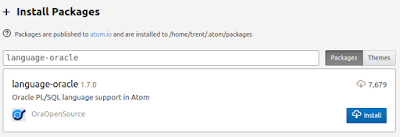
If you are an Oracle developer and use Atom text editor, here are some extensions that may make your development experience more pleasant. language-oracle build-oracle autocomplete-oracle (experimental/early) plsql-block language-oracle This extension aims to provide the syntax highlighting into Atom. It was converted from a text mate bundle back in October 2015, with a few little tweaks here and there since. To install, open your settings dialog (ctrl+,), go to the Install node and search "language-oracle". The package should come up as the first result, so hit the install button. (alternatively, from the command line, run: `apm install language-oracle`) After it's installed, your favourite extensions for Oracle DDL should now be picked up as PL/SQL (Oracle) in the status bar and the keywords and package references should be appropriately styled. build-oracle You may recall I blogged about compiling Oracle code back in September 2...

APEX URLs and HTML need not be in your SQL report queries

Image
I've seen a few examples recently where people have been embedding URLs and HTML into their SQL queries. I tend to advocate keeping such things out of the query itself and using APEX functionality such as link target and html expressions (in SQL Query column attributes). First example, a full page URL embedded into a column like so (conditionally based on some condition): case when job = 'PRESIDENT' then 'f?p='||:APP_ID||':2:'||:APP_SESSION||'::::P2_EMPNO:'||empno else  'f?p='||:APP_ID||':3:'||:APP_SESSION||'::::P3_EMPNO:'||empno end dest_url Then on the column attributes, you make it a link by specifying the type as a link and the target as a URL specifying the target as #DEST_URL# Taking a look at the URL, we can see there is only one bit changing, and that is the page number. So, we can avoid embedding the whole URL in our query by simply adding a column for our destination page: case when job = 'P...

Password filling with KeePass2 - Ubuntu, Chrome and APEX

Image
Overview Whilst I was on holidays, I saw a tweet mentioning about an APEX enhancement request for browsers to handle passwords in the password manager better. In particular, a feature request was logged which you can see here:  https://apex.oracle.com/pls/apex/f?p=55447:19:6596361215587:::19:P19_ID:74216354513552635850397961060065487893 Basically, you can have a multitude of passwords under the same domain, but with different workspaces, sometimes not handled greatly. There was a bit of back and forth, mention of 1Password not having the issue - this is a non-free product and seemingly no (official) client for Linux. And finally, came the following tweet: @rimblas @sspendol for KeePass this works - custom field & keystroke sequence (need to focus the WS item first) — Jeffrey Kemp (@jeffreykemp) July 18, 2016 This key sequence is a shortcut that you can type so that if you're in the target window, the specified key stroke will be executed. In my limited testing, I...

Preparing for CSS grids

Image
I was just listening to "The Web Ahead" podcast where they were talking about the upcoming CSS grid system. If you can spare the time, go and take a listen (episode 114). Upcoming in the sense that there is a spec, but it's not yet mainstream - you can enable it through a flag in WebKit based browsers; use Firefox nightly (e.g I'm on Chrome 51 and it seems to be available). So you can't use it in your production applications just yet - soon'ish. So, to get started (if using Chrome), you will want to enable experimental web platform features: You can see the current working draft here -  https://www.w3.org/TR/css-grid-1/ It's worth taking note of the motivation behind this. If you look for CSS layouts, you will see a bunch of solutions (probably involving floats) but using techniques not really designed for a full page layout. Let's get started making a grid. The containing element should have a display property of either grid or inline-grid. ...

Understanding variable scope

Image
In APEX, we have two primarily languages we would tend to work with: PL/SQL JavaScript So, it's worth being aware of how variable scoping works in any program units you are developing. If you don't already know it, JavaScript has function level scope, rather than block level scope. If you come from C-based language, and declare a variable inside a for loop, for instance, you would not expect that variable to live on outside of the loop. This is not the behaviour of JavaScript, so let's give this a test to see: When the variable i is declared, it is actually hoisted up to the to the top of the function. If you added a statement to the top of the function referencing i, i would have the value of undefined rather than a ReferenceError about using an undeclared variable. No matter where a variable is declared in JavaScript, it is hoisted to the top of the containing function - something to be aware of. That's why you will often see JavaScript pr...

The making of my APEX competition dashboard map

Image
The other day, I submitted my entry into the APEX dashboard competition. It was interesting, as I had never done any projects with map visualisations so gave me the opportunity to learn a little on the topic - now that I've submitted my entry and my demo is set up, I think it's time to share what I learnt along the way. First of all, GovHack (Australia) has this article on all things maps -  http://govhack-toolkit.readthedocs.org/technical/making-maps/ . So, having read that, I decided D3JS was the way forward. I managed to find a sample of a German map set up using this library (D3JS and topoJSON) -  http://bl.ocks.org/oscar6echo/4423770 . It uses a JSON file that contains all the data points to render all the data, but I had no clue how this data was obtained/generated just from that example - so I kept digging. Which led me onto this great article, which pretty much takes you step by step on drawing the map components:  https://bost.ocks.org/mike/map/ - and import...

Accepting payments with Stripe in APEX, Part 3

Image
Hooking everything up in APEX In part 1 of the series, we set up a form that would accept payment information. In part 2 we set up a PL/SQL API. Now, the final step is that we want to actually charge the card after the user submits the payment information, which is relatively straight forward. First, we can set up a couple of substitution strings for our stripe secret and the wallet information Next, add a new (hidden) item to the page that we can set the token into it (I called mine "P1_PMT_TOKEN"). Once that is on the page, we can modify our existing dynamic action (from part 1), so the code now looks like: var handler = StripeCheckout.configure({ key: 'pk_test_oXgwgmJbBmhzODwHxoKE8zAz', locale: 'auto', token: function(token) { $s('P1_PMT_TOKEN', token.id); } }); handler.open({ name: 'Demo Site', description: '2 widgets', currency: "aud", amount: 2000 }); Now, after the...